Advanced JavaScript Concepts - Deep Dive

call, apply, and bind – What’s the Difference?
All three of the call, bind, and apply methods set the this argument to the function.
The
callandapplymethods setthisto a function and call the function.The
bindmethod will only setthisto a function. We will need to separately invoke the function.
Basic Example
const person = {
  name: "Nandan",
};

function greet(greeting) {
  console.log(`${greeting}, ${this.name}`);
}
call
Calls the function and passes arguments one by one.
greet.call(person, "Hello"); // Hello, Nandan
apply
Same as call, but takes arguments as an array.
greet.apply(person, ["Hi"]); // Hi, Nandan
bind
Returns a new function with this set, but doesn’t call it immediately.
const greetPerson = greet.bind(person);
greetPerson("Hey"); // Hey, Nandan
Conclusion
Understanding call(), apply(), and bind() helps you control the this context in JavaScript functions. These methods are essential for writing flexible and reusable code, especially when working with object methods or borrowing functions. Mastering them makes your code more predictable and easier to debug.
Debouncing and Throttling – Stop Too Many Calls!
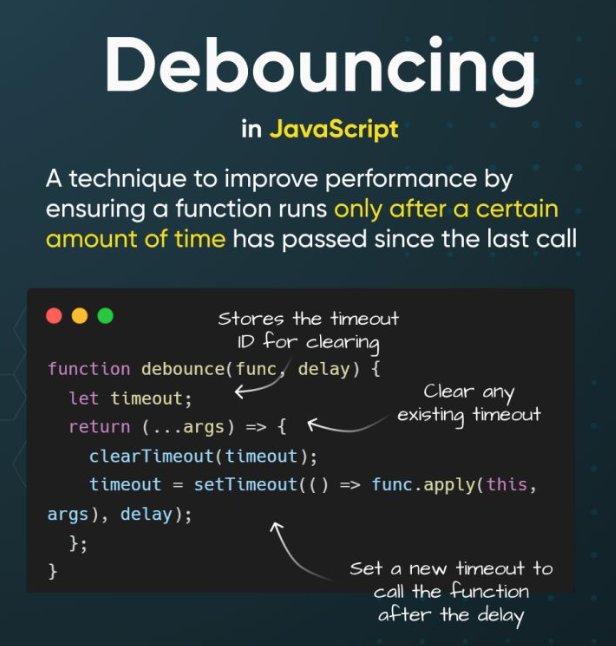
What is Debouncing?
Debouncing is a programming pattern commonly used in JavaScript to optimize the performance of web applications by limiting the rate at which a function can be executed. This technique is especially useful for handling events that fire repeatedly within a short period, such as window resizing, scrolling, keypresses, and other user interactions.
function debounce(func, delay) {
  let timer;
  return function () {
    clearTimeout(timer);
    timer = setTimeout(func, delay);
  };
}

const search = debounce(() => {
  console.log("Searching...");
}, 300);
Use Case: Typing in a search bar.
Throttling
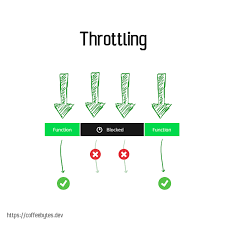
Runs the function every fixed time, no matter how many times it's called.
function throttle(func, limit) {
  let waiting = false;
  return function () {
    if (!waiting) {
      func();
      waiting = true;
      setTimeout(() => (waiting = false), limit);
    }
  };
}

const scroll = throttle(() => {
  console.log("Scrolling...");
}, 500);
Use Case: Scroll event handler.
Conclusion
Debouncing is a powerful technique in JavaScript that helps manage the frequency of function executions, particularly in response to user events. By ensuring that a function is only called after a certain period of inactivity, debouncing enhances performance, improves user experience, and reduces server load. Understanding and implementing debouncing can be crucial for optimizing modern web applications.
Throttling ensures that a function runs at regular intervals, no matter how often an event occurs. This is especially useful for high-frequency events like scrolling or resizing. Throttling helps improve performance by reducing unnecessary function calls while still keeping the UI responsive.
Closures – Functions Remember Stuff
A closure is when a function “remembers” the variables from the place where it was created.
Simple Closure Example
function outer() {
  let counter = 0;
  return function inner() {
    counter++;
    console.log(counter);
  };
}

const count = outer();
count(); // 1
count(); // 2
Conclusion
Closures allow inner functions to access variables from their outer function even after the outer function has returned. This concept is key to creating private variables, managing state, and writing cleaner, modular code. A solid grasp of closures will help you better understand how JavaScript functions truly work.
this in JavaScript – What It Refers To
Global Scope
console.log(this); // window (in browser)
Inside a Method
const user = {
  name: "Nandan",
  greet() {
    console.log(this.name);
  },
};

user.greet(); // Nandan
With call, apply, bind
const greet = user.greet;
greet(); // undefined

greet.call(user); // Nandan
Conclusion
The value of this changes depending on how and where a function is called. Understanding its behavior is critical to writing bug-free code, especially in object methods, event handlers, and callbacks. Mastering this will give you better control over your function logic and context.
📦 JavaScript Modules – import and export
Instead of loading all scripts in one file, you can split code and reuse it easily.
✍️ Examples
math.js
export function add(a, b) {
  return a + b;
}
main.js
import { add } from './math.js';

console.log(add(2, 3)); // 5
Old Way (Script Tags)
<script src="math.js"></script>
<script src="main.js"></script>
Modern modules avoid polluting the global scope and support better structure.
Conclusion
Modules help keep your code clean, organized, and reusable. By using import and export, you can split logic across files and avoid global variable conflicts. Learning modules is essential for building scalable, maintainable applications in modern JavaScript development.
Error Handling – try, catch, and Custom Errors
Basic Example
try {
  const a = b + 1; // b is not defined
} catch (error) {
  console.error("Error caught:", error.message);
}
Custom Error
class MyError extends Error {
  constructor(message) {
    super(message);
    this.name = "MyError";
  }
}

throw new MyError("Something went wrong");
✅ Best Practices
Always use
try-catchfor async/critical code.Log errors with
error.message.Use custom errors for better control.
Conclusion
Handling errors properly with try, catch, and custom error classes allows your application to fail gracefully and stay reliable. Good error handling improves user experience and helps debug issues faster. Writing clear and consistent error logic is a key skill for every JavaScript developer.
✅ Final Thoughts
| Concept | Use Case |
call/apply | Change this for a function |
bind | Store a fixed this |
| Debounce | Wait before running (search bar) |
| Throttle | Limit function call frequency |
| Closure | Remember variables (private state) |
this | Refers to the calling context |
| Module | Organize and reuse code |
| Error Handling | Manage crashes and issues |
Summary
call: binds thethisvalue, invokes the function, and allows you to pass a list of arguments.apply: binds thethisvalue, invokes the function, and allows you to pass arguments as an array.bind: binds thethisvalue, returns a new function, and allows you to pass in a list of arguments.Debouncing
Waits until the user stops doing something (like typing) before running a function.
Good for search boxes.
Throttling
Limits how often a function runs (e.g., every 500ms).
Good for scroll events.
Closures
A function that remembers variables from where it was created.
Useful for private counters or state.
thisKeywordChanges depending on how a function is called (global, object method, etc.).
call,apply,bindhelp manage it.
JavaScript Modules
Use
importandexportto split code into files.Cleaner and avoids polluting the global scope.
Error Handling
Use
tryandcatchto catch errors.Create custom errors for better control.


