Components and Props In React

Introduction to React Components
React is a powerful JavaScript library that has revolutionized web development by introducing a component-based architecture. In this blog post, we will provide an introduction to React components and delve into their significance in building robust and scalable web applications. React components are reusable building blocks that encapsulate the logic and presentation of specific parts of a user interface. They can be thought of as Lego bricks that can be combined and rearranged to construct complex UIs. Components are at the heart of React development, enabling developers to create modular, maintainable, and reusable code. One of the key benefits of using React components is their ability to facilitate code reusability. By encapsulating specific functionality and presentation into self-contained components, developers can easily reuse and share these components across different parts of an application. This reduces code duplication and enhances productivity. Moreover, React components are highly customizable and can be easily composed to create complex UIs.

They can be nested within one another and pass data between them, allowing for a hierarchical structure that reflects the user interface's composition. To illustrate this concept, consider a simple component hierarchy for a blog application. Starting with a parent component called "BlogPost," we can have child components such as "Title," "Author," and "Content." Each of these components can further have their own child components, forming a tree-like structure that represents the entire blog post. In summary, understanding React components is crucial for effective web development with React. By harnessing the power of components, developers can create flexible, scalable, and maintainable web applications.
Component Lifecycle and Hooks
The Component Lifecycle and Hooks feature in React plays a crucial role in managing the behavior and appearance of components throughout their lifespan. Understanding how components are created, rendered, updated, and destroyed is essential for developing powerful web applications. React offers a component lifecycle consisting of several methods that can be overridden to control the component's behavior at each stage. These methods can be divided into three phases: Mounting, Updating, and Unmounting. During the Mounting phase, the component is created, initialized, and added to the DOM. The Updating phase occurs when the component's state or props change, triggering a re-render. Finally, during the Unmounting phase, the component is removed from the DOM and destroyed. In addition to the lifecycle methods, React introduced Hooks, a revolutionary feature that allows developers to use state and other React features without writing class components. Hooks provide a more intuitive and functional approach to managing component state and side effects.
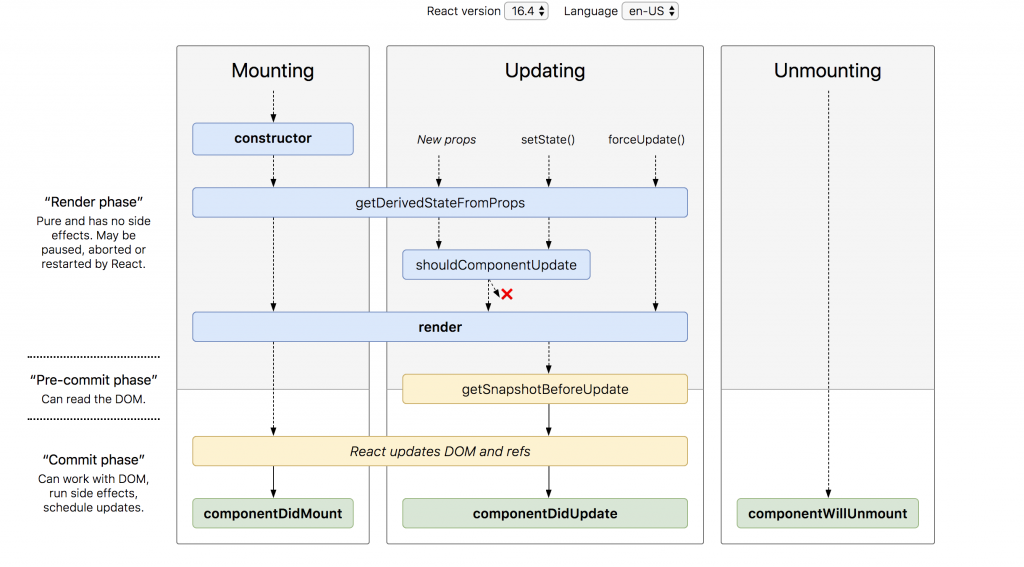
The image shows the different phases of the React component lifecycle, illustrating when each method is called during the component's lifespan. By leveraging the power of component lifecycle methods and hooks, developers can create dynamic and interactive web applications with ease. This understanding of component lifecycles facilitates efficient debugging, optimization, and graceful handling of component behavior at each stage.
Creating Reusable and Composable Components
In modern web development, creating reusable and composable components is crucial for building scalable and maintainable applications. React, a popular JavaScript library, provides a powerful solution to achieve this goal. React components act as building blocks for user interfaces. They encapsulate both the visual and functional aspects of a specific feature or element on a webpage. By breaking down the application into smaller components, developers can easily reuse them throughout the project, promoting code reusability and reducing redundancy. One notable advantage of creating reusable components in React is the ability to compose them together to form more complex structures. This composition allows developers to combine multiple components, passing data and props between them, to create dynamic and interactive user interfaces effortlessly. To create reusable and composable components in React, it's important to emphasize proper component design and separation of concerns. By isolating each component's responsibilities, developers can easily maintain and update them independently. In terms of visual representation, an image showcasing a composition of React components forming a dynamic web page layout would be relevant. It would highlight the modular nature of React components and their ability to combine seamlessly.
What are Props in React? — My Way
Props (short for properties) are just a way to pass data from one component to another in a React app. Think of it like giving instructions or sending a message from a parent component to its child.
Why Do We Need Props?
In a component-driven framework like React, your UI is broken into small, reusable parts called components — like buttons, cards, navbars, etc.
Now sometimes, these components need data from other components. For example:
A
UserCardneeds to know the user’s name and photoA
Buttonmight need a custom text like "Submit" or "Cancel"
That’s where props come in — they help components talk to each other.
Root

|
v
CompA CompB

|      |
v      v
CompC CompD
The Root component is root of the component tree, it renders the components CompA and CompB. They in turn render CompC and CompD. Let's say that CompD needs data to render and the data comes from CompB, we see that CompB must pass that data to CompD
Root

|
v
CompA CompB

|      | dataToRender: 90
v      v
CompC CompD
On the other hand, we might need to send data upward from a child to a parent.
Root

|
v
CompA CompB
        ^
|      | |dataToRender: 90
v      v
CompC CompD
Props in React
Props are the main backbone of Reactjs, it is one of the basic features that made Reactjs awesome and powerful. Props in Reactjs are used for one-way and bidirectional way communication in Reactjs components.
Think of props as arguments to functions. Functions in JS are a group of codes that perform a task. We can have a function that returns the summation of 1 and 2:
function sum() {
  return 1 + 2;
}
This function returns the summation of 1 and 2. We can make this function to be flexible enough not to sum only 1 and 2 but to sum any two numbers. We will make it to accept two arguments.
function sum(firstNumber, secondNumber) {
  return firstNumber + secondNumber;
}
Here, now we can add two numbers:
sum(1, 2); // 3
sum(90, 23); // 113
We are using the sum function passing to it what we need it to work with. This is the same concept as "props" in React components. Components in React are JavaScript functions and ES6 classes. The arguments we pass to functions are now "props" in React Components.
React Components written as functions are known as Functional Components. While the ES6 components are known as Class Components.
Functional Components are basically JavaScript functions. Let's see an example:
function FunctionalComponent() {
  return <div>Hello</div>;
}
We can now render it like this:
<FunctionalComponent />
Very simple.
Now, to pass props to a React Component, we pass them like attributes on an HTML element:
<img src="./image.jpg" width="120" height="90" />
The attributes here are src, width, and height. The img uses them to render an image. So these attributes are just like passing arguments to a function.
So similar to the thing we do on a React component:
<ReactComponent data1="Hi" data2={20} />
The props here in the ReactComponent is data1 and data2. So, the question is how do we get to access and use them in the ReactComponent? Now, React gathers all the "attributes" in the Component and adds them to an argument object it passes to the Component it is being rendered.
function ReactComponent(props) {}
The props argument is an argument that React passes to its Components when they are being rendered(and updated too). The name is not just to be props, it can be anything. I was following naming conventions, the props name tells us it's a prop/property passed to the Component.
So, the "attributes" passed to the ReactComponent can be accessed as properties in the props argument. As we said before the props argument is an object.
function ReactComponent(props) {
  typeof props; // "object"
  return null;
}
Now, we can access the data1 and data2 in the props
function ReactComponent(props) {
  const data1 = props.data1;
  const data2 = props.data2;
  return null;
}
We can display the props:
function ReactComponent(props) {
  const data1 = props.data1;
  const data2 = props.data2;
  return (
    <div>
      <span>Data 1: {data1}</span>
      <span>Data 2: {data2}</span>
    </div>
  );
}
We can convert our first example of the sum function as a React Component. This is it:
function Sum() {
  return <div>{1 + 2}</div>;
}
We render it:
<Sum />;

// <div>3</div>
Let's make accept two numbers to sum and then display the result:
function Sum(props) {
  const firstNumber = +props.firstnumber;
  const secondNumber = +props.secondnumber;

  const result = firstNumber + secondNumber;

  return (
    <div>
      <span>
        Summing {firstNumber} and {secondNumber}{" "}
      </span>
      <span>{result}</span>
    </div>
  );
}
From this, we know now that we will pass the numbers we want to sum to the Sum component in firstNumber and secondNumber props.
//let's display the summation of 1 and 2:

<Sum firstNumber={1} secondNumber={2} />
The display will be this:
<div>
  <span> Summing 1 and 2 </span>
  <span>3</span>
</div>;
We can pass any data type as props in React components: object, array, boolean, number, string, function, etc.
Object
Yes, it is possible to pass objects to React components. Let's say you have the below object in a parent component and want to pass it to a child component so it can display the object's property values.
const user = {
  id: 0,
  name: "Chidume Nnamdi",
  age: 54,
};
We pass it to the component like this:
<DisplayUser user={user} />
Very simple.
Now, we can access the user prop in the DisplayUser component in the props object.
function DisplayUser(props) {
  const user = props.user;

  return (
    <div>
      <p>
        Name: <span>{user.name}</span>
      </p>
      <p>
        Age: <span>{user.age}</span>
      </p>
    </div>
  );
}
Conclusion:
In React, components are just small parts of the UI — like cards, buttons, headers — and we use them to build the full app piece by piece.
But just creating components isn’t enough. We need to send data between them, and that’s where props come in.
Props are like inputs we pass to components to make them dynamic and reusable. They help components talk to each other, especially from parent to child.
So basically:
Components build the UI.
Props make them smart and useful.
Both are super important — you’ll use them everywhere in React.


