Exploring Advanced Array Destructuring Techniques in JavaScript ES6

I'm a full-stack developer who loves turning ideas into real, usable products. I work with React, Node.js, MongoDB, and Tailwind to build clean, scalable web apps. I don’t just build demo projects — I focus on solving real problems with code. Always learning, always shipping.
Destructuring is a way to unpack values from an array or properties from an object. Using destructuring, you can take those values out of an array (or an object) and save them directly to other variables with just a single line of code, instead of taking one item or property at a time to variables.
Destructuring Array
In the previous example, we see the basic usage of array destructuring. Beyond that, there are features like skipping array items and using the rest operator.
Below is an example of how to skip some array items and take only selected values to other variables:
const values = [1, 2, 3, 4];
// This will take value 1 to firstValue, skip value 2, skip value 3, and save value 4 to lastValue
// So firstValue is 1 and lastValue is 4
let [firstValue,,,lastValue] = values;
You can also use the rest/spread operator to take values from any point of the array until the last value to a new array. Here is the example:
const values = [1, 2, 3, 4];
// This will save value 1 to a, 2 to b, and [3,4] to remainValues
let [a, b, ...remainValues] = values;
In the above code, ... is the rest operator. It makes the rest of the values of the variable values after 1 and 2 be held in the variable remainValues.
You can use array destructuring either directly on an array variable or on an array returned by a function as well. See the code below:
function add(a, b) {
  return [a, b, a + b];
}
// firstOp will hold the first element (a) of the array returned by the add function
// secondOp will hold the second element (b) of the returned array
// result will hold the third element (a+b) of the returned array
const [firstOp, secondOp, result] = add(2, 3);
Destructuring Object
Destructuring is also available for objects. Instead of extracting an object's properties one by one to some variables like this:
const name = {firstName: "John", middleName: "F.", lastName: "Kennedy"};
let firstName = name.firstName;
let middleName = name.middleName;
let lastName = name.lastName;
You can shorten your code with the help of object destructuring. Here is the way:
const name = {firstName: "John", middleName: "F.", lastName: "Kennedy"};
let {firstName, middleName, lastName} = name;
Take Object Properties and Save Them With Different Variable Names
When you take out the object properties to some variables, you don't always want to have variables with the same name as the properties. Sometimes you want different names. You can do this for sure:
const serverResponse = {success: true, data: {username: "Pegasus", photo: "somewhere.jpg"}};
const {data: user} = serverResponse;
console.log("User:", user);
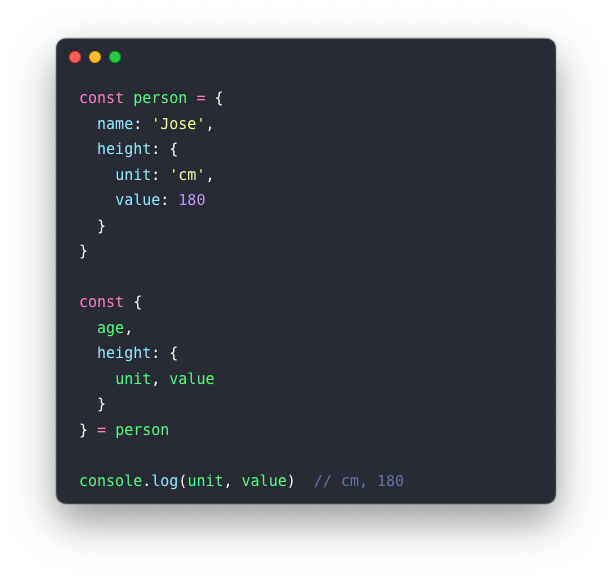
In the line const {data: user} = serverResponse;, you take the data property from serverResponse and save it to a variable named user. The renaming code is {data: user}. data is a property of the object, and user is the variable that will hold the property's value.
ES6 Way to Clone an Array
When you need to copy an array, you often used slice. But with ES6, you can also use the spread operator to duplicate an array. Pretty nifty, right?
const sheeps = ['🐑', '🐑', '🐑'];

// Old way
const cloneSheeps = sheeps.slice();

// ES6 way
const cloneSheepsES6 = [...sheeps];
Why Can’t You Use = to Copy an Array?
Because arrays in JS are reference values, when you try to copy it using =, it will only copy the reference to the original array and not the value of the array. To create a real copy of an array, you need to copy over the value of the array under a new variable. That way, this new array does not reference the old array's address in memory.
const sheeps = ['🐑', '🐑', '🐑'];

const fakeSheeps = sheeps;
const cloneSheeps = [...sheeps];

console.log(sheeps === fakeSheeps);
// true --> it's pointing to the same memory space

console.log(sheeps === cloneSheeps);
// false --> it's pointing to a new memory space
Problem with Reference Values
If you ever dealt with Redux or any state management framework, you know immutability is super important. Let me briefly explain. An immutable object is an object where the state can't be modified after it is created. The problem with JavaScript is that arrays are mutable. So this can happen:
const sheeps = ['🐑', '🐑'];

const sheeps2 = sheeps;

sheeps2.push('🐺');

console.log(sheeps2);
// [ '🐑', '🐑', '🐺' ]

// Ahhh 😱 , our original sheeps have changed?!
console.log(sheeps);
// [ '🐑', '🐑', '🐺' ]
That's why you need to clone an array:
const sheeps = ['🐑', '🐑'];

const sheeps2 = [...sheeps];

// Let's change our sheeps2 array
sheeps2.push('🐺');

console.log(sheeps2);
// [ '🐑', '🐑', '🐺' ]

// ✅ Yay, our original sheeps is not affected!
console.log(sheeps);
// [ '🐑', '🐑' ]
Conclusions🎉
Destructuring lets you pull out values from arrays or objects in one line.
It's clean and saves time.You can skip values, use the rest (
...) to grab the leftover parts, and even rename variables while unpacking.Arrays in JavaScript are linked by reference. If you copy with
=, both variables point to the same array. Changing one affects the other.Use
[...array]to make a real copy. That way, changing the new one won't mess up the original.This is super helpful when you want to keep your data safe, like in Redux or any state updates.


