Introduction to Node.js
How Does Node.js Work?
Node.js is an open-source runtime environment, it is a tool that lets you run JavaScript on the server, outside of the browser.
Normally, JavaScript runs only in the browser (like Chrome or Firefox). But with Node.js, you can use JavaScript to build backend applications, servers, APIs, and much more.
Key Features and Concepts:
Why is NodeJS so famous?
Single-Threaded Event Loop
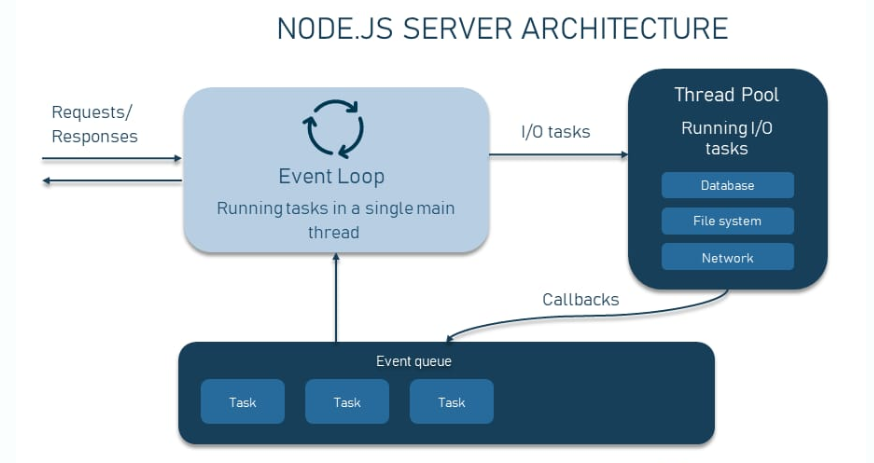
Node.js operates on a single-threaded event loop architecture. This means that it handles multiple concurrent requests without creating a new thread for each request. Instead, it uses a single thread to manage all incoming requests. This is achieved through non-blocking I/O operations and asynchronous programming.
Non-Blocking I/O
Non-blocking I/O allows Node.js to handle multiple requests simultaneously without waiting for one request to complete before starting another. When Node.js performs an I/O operation, such as reading from a file or accessing a database, it does not block the thread. Instead, it continues to process other requests and resumes the I/O operation when the response is ready.
Asynchronous Programming
Asynchronous programming is a key feature of Node.js. It uses callback functions to handle responses from I/O operations. When an I/O operation is completed, the callback function is executed, allowing Node.js to handle other tasks in the meantime.
NPM (Node Package Manager):
Node.js comes with npm, a package manager that allows developers to easily install and manage third-party libraries and modules.
Built-in Modules:
Node.js provides built-in modules for tasks like handling HTTP requests, file system operations, and more.
Use Cases:
Web Servers: Building web servers and APIs.
Real-time Applications: Developing real-time applications like chat apps and streaming services.
Command-Line Tools: Creating command-line interfaces and tools.
Microservices: Implementing microservices architectures.
Data-Intensive Applications: Handling data-intensive applications due to its asynchronous nature.
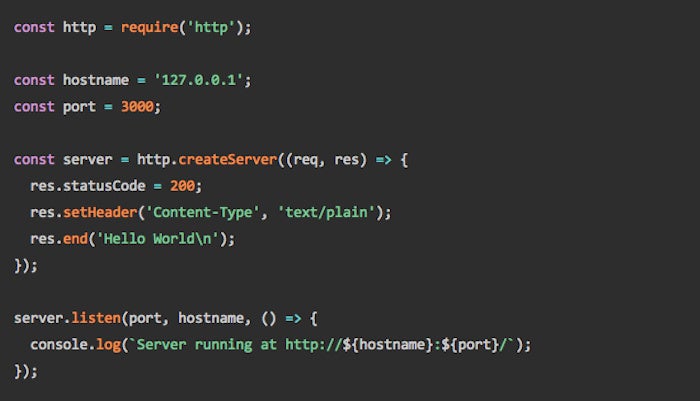
Example: A Web Server in Node.js
Why Node.js is Perfect for Building Fast Web Apps
High Performance with Non-Blocking I/O: Node.js handles multiple API requests efficiently, ideal for real-time and data-intensive apps.
Full-Stack Development in JavaScript: Write frontend and backend in the same language, reducing development time and improving collaboration.
Native JSON Support: Seamless integration with REST APIs and easy data exchange across platforms.
Microservices-Ready Architecture: Scale easily by breaking apps into smaller, manageable services.
Rich Ecosystem with NPM Modules: Accelerate development using thousands of pre-built packages for common API features.
TypeScript Integration: Add type safety and better maintainability for robust, enterprise-grade API-driven applications.
Modern Deployment Strategies: Use Docker, CI/CD, serverless, or PM2 to ensure your APIs remain scalable, resilient, and easy to manage.

Node.js server architecture
The philosophy behind Node.js is to let the application do its work and perform operations even when the previous operation hasn’t been completed because of input/output bottlenecks. The approach is called non-blocking input/output operations.
⊕ Robust technology stack
JavaScript has proven to be an undisputed leader among the most popular programming languages. In turn, Node.js has become a stand-alone name in the industry. According to W3Techs, Node.js is used by 2.1 percent of all websites, which number at least 30 million.
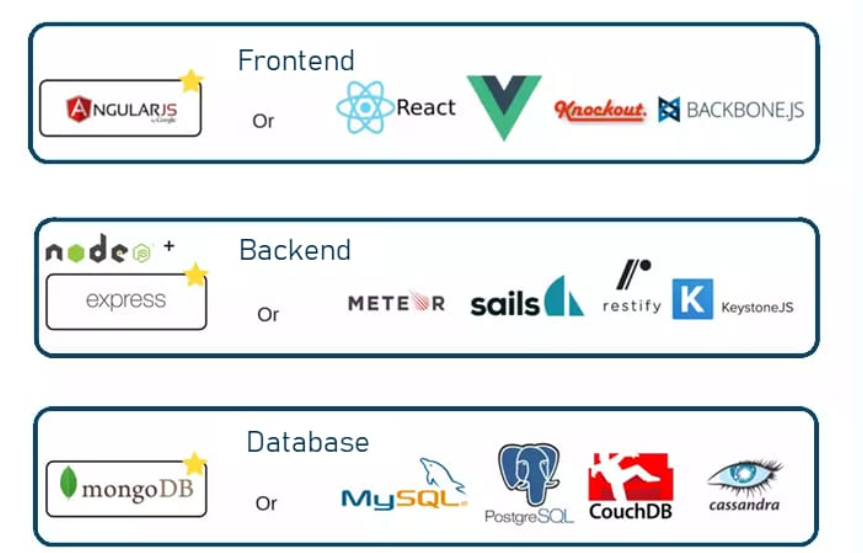
Using Node.js for backend, you automatically get all the pros of full stack JavaScript development, such as:
better efficiency and overall developer productivity
code sharing and reuse
speed and performance
easy knowledge sharing within a team
a huge number of free tools
Consequently, your team is a lot more flexible, the development is less time-consuming, resulting in fast and reliable software. Developers trained in frontend JavaScript can start programming the server side with minimum effort. With the same language on both sides, you can reuse code on the frontend and the backend by wrapping it into modules and creating new levels of abstraction.
Node.js vs PHP / Java – The Key Differences
| Feature | PHP / Java | Node.js |
| Language | PHP, Java | JavaScript |
| Execution Model | Blocking, multi-threaded (Java), or process-based (PHP) | Non-blocking, single-threaded with async I/O |
| Performance | Slower for I/O-heavy tasks | Fast for I/O-heavy operations |
| Ease of Setup | PHP: Easy, Java: Moderate | Easy (install and run) |
| Learning Curve | PHP: Easy, Java: Moderate/Hard | Easy (if you know JS already) |
| Community Support | Large | Huge and growing |
| Common Use Cases | CMS (WordPress), enterprise apps | APIs, microservices, real-time apps, tools |
What Makes Node.js So Fast?
Understanding Non-Blocking and Event-Driven with a Real-World Analogy
If you’ve heard people say Node.js is fast because it’s “non-blocking” and “event-driven” — but didn’t quite get what that means — you’re not alone. 😅
Let me explain it in the simplest way possible — with a restaurant analogy.
Imagine Two Kitchens
Kitchen 1 — Traditional (PHP or Java style)
In this kitchen, there’s one chef.
A customer walks in and places an order.
The chef starts cooking the dish.
Until that meal is done, the chef won’t even talk to the next customer.
When it’s done, the chef delivers it, then moves to the next order.
Sounds slow, right?
This is how blocking or synchronous systems (like traditional PHP or Java servers) often work. Each task is handled one at a time, even if it’s something slow like waiting for a file to load or a database to respond.
Kitchen 2 — Node.js Style
In this kitchen, the chef is smart.
A customer places an order.
The chef quickly hands it off to a kitchen assistant.
While that order is being cooked in the background, the chef is already taking the next customer’s order.
When the meal is ready, a bell rings, and a waiter delivers it to the right person.
Here, the chef doesn’t stop for anything — they just keep going.
That’s exactly how Node.js works — it’s non-blocking and event-driven.
🧠 So What’s Happening Behind the Scenes?
When Node.js gets a task that might take time (like reading a file or querying a database), it:
Starts the task in the background.
Moves on to the next request.
When the task is ready, it’s handed back via a callback or event.
That’s why Node.js is great for things like:
Handling hundreds of users at once
Building real-time apps (chats, notifications)
APIs that need to talk to databases
Quick Code Example
Here’s a small example of Node’s non-blocking nature:
const fs = require("fs");

fs.readFile("bigfile.txt", (err, data) => {
  if (err) throw err;
  console.log("✅ File has been read");
});

console.log("📂 Reading file in the background...");
Output:
📂 Reading file in the background...
✅ File has been read
Even though we’re reading a file (which takes time), Node keeps moving. It doesn't wait — it delegates and continues.
In Simple Words
Node.js doesn’t wait — it multitasks efficiently.
It’s like having a restaurant that never makes you wait in line, even when it’s full.
That’s what makes Node lightweight, fast, and ideal for modern web development.

🚀 Setting Up Your First Node.js App (A Friendly Step-by-Step Guide)
Hey there! 👋
If you've been writing JavaScript in the browser and wondering, "Can I use JavaScript to build backend apps too?" — the answer is YES, and the magic tool behind it is Node.js.
In this guide, I’ll walk you through creating your very first Node.js app from scratch. No fluff, just a clean and simple setup.
What We’re Building
We’ll set up a basic Node.js project and spin up a tiny web server that says hello when you visit it in the browser.
No frameworks, just raw Node.js to help you understand what’s happening under the hood.
✅ Step 1: Install Node.js
First, you need to install Node.js on your system.
Head over to nodejs.org
Download the LTS version (it’s more stable).
Install it like any other app.
Once installed, check if it worked:
node -v
npm -v
You should see the version numbers. If you do — you’re ready!
Step 2: Create a Project Folder
Let’s set up your project in a fresh folder.
mkdir my-first-node-app
cd my-first-node-app
Easy, right?
Step 3: Initialize the Project
Now let’s tell Node that this is a real project:
npm init -y
This will create a package.json file. It’s like your project’s resume — it keeps track of its name, version, and any packages you install.
🧪 Step 4: Write Your First Node App
Let’s write our first piece of backend code!
Create a new file:
touch index.js
Add this inside index.js:
console.log("Hello from Node.js!");
Run it:
node index.js
🎉 You should see: Hello from Node.js!
Congrats, you just ran JavaScript outside the browser!
🌐 Step 5: Create a Web Server
Now, let’s level up and make a real web server.
Replace the code in index.js with:
const http = require("http");

const server = http.createServer((req, res) => {
  res.end("Welcome to my first Node.js app!");
});

server.listen(3000, () => {
  console.log("Server is running at http://localhost:3000");
});
Run it:
node index.js
Then open your browser and go to:
👉 http://localhost:3000
Boom 💥 — you just built a web server!
🛠️ Step 6: Add Nodemon (Optional but Awesome)
Typing node index.js every time you change something can get annoying.
Let’s install a tool called nodemon that auto-restarts your app when you save a file.
npm install --save-dev nodemon
Now, update your package.json like this:
"scripts": {
  "start": "node index.js",
  "dev": "nodemon index.js"
}
Run this instead:
npm run dev
Now every time you change the file, it’ll restart automatically. Super handy!
🧠 Bonus Tips (For Later)
Add a
.gitignorefile to ignorenode_modulesUse
dotenvfor managing API keys and secretsLearn Express.js to make building APIs even easier
✅ Wrapping Up
You did it! 🎉
You’ve set up your very first Node.js app — from installing Node to spinning up your own web server.
Node.js opens up a whole world of backend development, and this is just the start.
What’s Next?
👉 Learn how to build REST APIs with Express.js
👉 Try connecting your server to a database like MongoDB or PostgreSQL
👉 Deploy your app with services like Render, Vercel, or Railway
Conclusion 🚀
Node.js isn’t just another backend tool — it’s a whole mindset shift. It takes JavaScript, a language we usually associate with the browser, and brings it to the server, unlocking full-stack development like never before.
From its non-blocking, event-driven magic to the huge ecosystem of packages through npm, Node.js helps you build apps that are fast, lightweight, and scalable — especially when real-time speed matters.
And the best part? If you already know a bit of JavaScript, you’re more than halfway there.
Whether you're building a tiny hobby project or the next big real-time app, Node.js gives you the tools, the speed, and the flexibility to make it happen — all using just one language.
So go ahead — fire up your terminal, write some backend logic, and experience what it's like to build with Node.js.
This is just the beginning. 🚀


